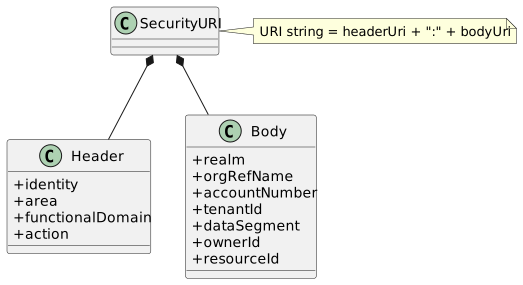
This section explains how Quantum evaluates permissions for REST requests using rule bases that match on a SecurityURI composed of a header and a body. The header includes identity, area, functionalDomain, and action. The body includes realm, accountNumber, tenantId, dataSegment, ownerId, and resourceId. It also covers how identities and roles (as found on userProfile or credentialUserIdPassword) are matched, how priority works, and how multiple matching rule bases are evaluated.
1. Introduction: Layered Enforcement Overview
Quantum evaluates "can this identity do X?" through three complementary layers. Understanding them in order helps you pick the right tool for the job and combine them safely:
-
REST API annotations (top layer, code-level)
-
What: JAX-RS/Jakarta Security annotations on resource methods, for example,
@RolesAllowed("ADMIN"),@PermitAll,@DenyAll,@Authenticated. -
Purpose: Coarse-grained, immediate gates right at the endpoint. Ideal for baseline protections (for example, only ADMIN may call
/admin/**) and for non-dynamic constraints that rarely change. -
Pros: Simple, fast, visible in code reviews.
-
Cons: Hard-coded; changing access requires a code change, build, and deploy. No data-aware scoping (for example, cannot express tenant/domain filters).
-
-
Feature flags (exposure and variants)
-
What: Turn capabilities on/off per environment or cohort and select variants (A/B, multivariate). See "Feature Flags, Variants, and Target Rules" below.
-
Purpose: Control who even sees or can reach a capability during rollout (by tenant, role, geography, plan), independently of authorization. Flags answer "is the feature ON and which variant?"; they do not by themselves prove the caller is authorized.
-
Pros: Reversible, environment-aware, safe rollout and experimentation.
-
Cons: Not a substitute for authorization; must be paired with roles/permission rules for enforcement.
-
-
Permission Rules with SecurityURI (fine-grained, dynamic)
-
What: Declarative rule bases authored against a SecurityURI composed of header (identity, area, functionalDomain, action) and body (realm, accountNumber, tenantId, dataSegment, ownerId, resourceId). Rules decide ALLOW or DENY and may use an optional postconditionScript for additional checks. See sections "Key Concepts", "Matching Algorithm", and examples below.
-
Purpose: Express least-privilege, data-aware policies that evolve without code changes (data-driven authoring).
-
Pros: Dynamic, auditable, supports role-based matching and simple attribute scoping via the SecurityURI body.
-
Cons: Requires governance of rulebases and careful priority management.
-
How roles, Functional Areas, and Functional Domains fit in
-
Roles: Used by both layers (1) and (3). Annotations directly reference roles. In the rule engine, roles are evaluated by treating each role as an identity: rules authored for a role name (for example, "ADMIN") are considered alongside rules authored for the user’s own userId. Effective roles are resolved by merging IdP roles with roles on the user record; see "How roles are defined for an identity" below.
-
Functional Area/Domain: Derived from the URL convention
/{area}/{functionalDomain}/{action}as parsed bySecurityFilter.determineResourceContext. Author policies using these fields to target business capabilities rather than raw URLs or ad‑hoc headers. -
DataDomain: When rules ALLOW an action, they can attach data-scope filters (tenant/org/owner) so downstream reads/writes are constrained to the caller’s domain.
Choosing the right approach
-
Use annotations for stable, coarse gates you want visible in code (for example, admin-only endpoints, health endpoints with
@PermitAll). -
Use feature flags to manage rollout/exposure and variants across environments and cohorts.
-
Use permission rules to encode fine-grained, data-aware authorization and to evolve policy without redeploying.
Compare and contrast
-
Annotation-based controls are compile-time and hard-code policy into the service; changing them requires code changes.
-
Permission Rules and the Rule Language are data-driven and user-changeable (with proper governance), enabling rapid, auditable policy changes and DataDomain scoping.
-
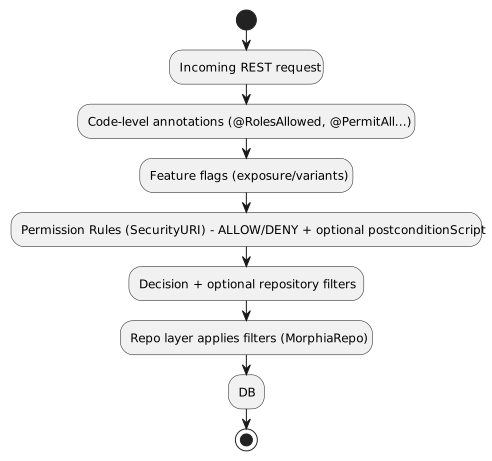
In practice: apply annotations as the first gate, evaluate feature flags to determine exposure/variant, then evaluate permission rules to decide ALLOW/DENY and attach scopes. This layered approach yields both safety and agility.
| Ontology- and label-aware policy helpers are available to postconditionScript when the optional ontology module is enabled. Helpers include hasEdge, hasAnyEdge, hasAllEdges, relatedIds for graph checks; hasLabel for label checks; and isA/noViolations for type/validation contexts. See the "Script Helpers reference" section for details. When data access must be restricted to lists resolved outside the rule engine (for example, from an external ACL service), use AccessListResolvers (SPI) and reference their outputs from andFilterString/orFilterString. |
2. Key Concepts
-
Identity: The authenticated principal, typically originating from JWT or another provider. It includes:
-
userId (or credentialUserIdPassword username)
-
roles (authorities/groups)
-
tenantId, orgRefName, optional realm, and other claims that contribute to DomainContext
-
-
userProfile: A domain representation of the user that adds human information such as first name, last name, email address, phone number and provides a linkage back to identity, roles, and policy decorations (feature flags, plans, expiration, etc.).
-
Rule Base (Permission Rule): A declarative rule with matching criteria and an effect (ALLOW or DENY). Criteria are authored against SecurityURI and may include:
-
SecurityURIHeader fields: identity (userId or role name), area, functionalDomain, action
-
SecurityURIBody fields: realm, accountNumber, tenantId, dataSegment, ownerId, resourceId
-
Optional postconditionScript evaluated with pcontext/rcontext for additional checks
-
Priority: integer used to sort rule evaluation (lower numbers evaluated first)
-
Effect: ALLOW or DENY; ALLOWs may be paired with repository-level scoping using the SecurityURI body (e.g., DataDomain constraints)
-
3. Rule Structure (Illustrative)
- name: allow-catalog-product-reads
  description: Allow USER and ADMIN to view products in the Catalog area
  securityURI:
    header:
      identity: USER            # or a specific userId; roles are treated as identities
      area: Catalog
      functionalDomain: Product
      action: view
    body:
      realm: system-com
      accountNumber: '*'
      tenantId: '*'
      dataSegment: '*'
      ownerId: '*'
      resourceId: '*'
  postconditionScript:
  effect: ALLOW
  priority: 300
  finalRule: false

- name: default-deny
  description: Fallback deny when nothing else matches
  securityURI:
    header:
      identity: '*'
      area: '*'
      functionalDomain: '*'
      action: '*'
    body:
      realm: '*'
      accountNumber: '*'
      tenantId: '*'
      dataSegment: '*'
      ownerId: '*'
      resourceId: '*'
  effect: DENY
  priority: 10000
finalRule: true-
The securityURI.header section corresponds to SecurityURIHeader: identity (userId or role name), area, functionalDomain, and action. Functional area/domain/action are typically derived from the URL convention
/{area}/{functionalDomain}/{action}by SecurityFilter. -
The securityURI.body section corresponds to SecurityURIBody: realm, accountNumber, tenantId, dataSegment, ownerId, and resourceId. These values are matched using simple string equality with support for the wildcard '*'.
-
Optional postconditionScript may be provided and is executed as JavaScript with pcontext and rcontext bindings; the rule only applies if the script evaluates to true.
4. Matching Algorithm
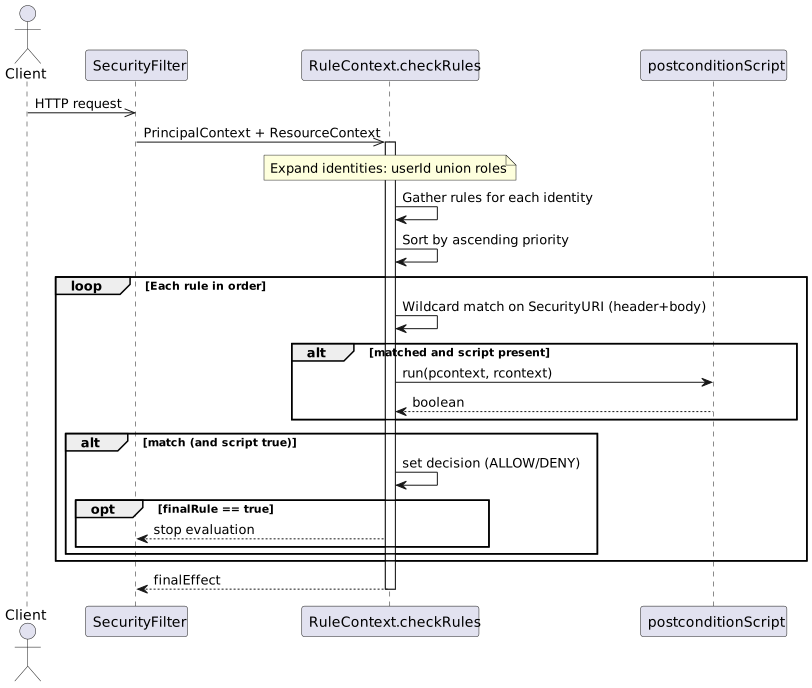
The engine evaluates permission rules using SecurityURI wildcard matching. At a high level:
-
Build ResourceContext
-
SecurityFilter derives area, functionalDomain, and action from the request path (or REST annotations if present) and sets the ResourceContext.
-
-
Expand identities
-
Build a set of identities consisting of the caller’s userId plus each effective role. Each of these identities is treated as a potential match target for rules.
-
-
Gather candidate rules
-
For each identity, collect rules authored for that identity. This forms the candidate set. There is no separate HTTP method/URL or rolesAny/rolesAll matching.
-
-
Sort by priority
-
Order candidates by ascending priority (lower numbers are evaluated first).
-
-
URI wildcard comparison
-
For each rule in priority order, compare the caller’s expanded SecurityURIs to the rule’s securityURI using case‑insensitive wildcard comparison on the full URI string (header + body). Asterisks ('*') in rules match any value.
-
-
Postcondition script (optional)
-
If the rule specifies postconditionScript, execute it as JavaScript with pcontext (principal) and rcontext (resource) variables bound. The rule applies only if the script returns true.
-
-
Apply effect and finalRule
-
When a rule matches (and any script returns true), set the response’s finalEffect to the rule’s effect (ALLOW or DENY). If finalRule is true, stop evaluating further rules; otherwise continue.
-
-
Default decision
-
If no rule determines a decision, the system returns the default final effect configured by the caller of the check (typically DENY).
-
5. Priorities
-
Lower integer = higher priority. Example: priority 1 overrides priority 10.
-
Use tight scopes with low priority for critical protections (e.g., denies), and broader ALLOWs with higher numeric priority.
-
Recommended ranges:
-
1–99: global deny rules and emergency blocks
-
100–499: domain/area-specific critical rules
-
500–999: standard ALLOW policies
-
1000+: defaults and catch-alls
6. Grant-based vs Deny-based Rule Sets
Grant-based rule sets start with a default decision of DENY and then incrementally add ALLOW scenarios through explicit rules. This model is fail‑safe by default: any URL, action, or functional area that does not have a matching ALLOW rule remains inaccessible. As new endpoints or capabilities are added to the system, users will not gain access until an explicit ALLOW is authored. This is the recommended posture for security‑sensitive systems and multi‑tenant platforms.
Deny-based rule sets start with a default decision of ALLOW and then add DENY scenarios to carve away disallowed cases. In this model, new functionality is exposed by default unless a DENY is added. While convenient during rapid prototyping, this posture risks accidental exposure as the surface area grows.
Practical implications:
-
Change management: Grant-based requires adding ALLOWs when shipping new features; Deny-based requires remembering to add new DENYs.
-
Auditability: Grant-based policies make it easy to enumerate what is permitted; Deny-based requires proving the absence of permissive gaps.
-
Safety: In merge conflicts or partial deployments, Grant-based tends to fail closed (DENY), which is usually safer.
Example defaults:
-
Grant-based (recommended):
- name: default-deny
  priority: 10000
  securityURI:
    header: { identity: '*', area: '*', functionalDomain: '*', action: '*' }
    body:   { realm: '*', accountNumber: '*', tenantId: '*', dataSegment: '*', ownerId: '*', resourceId: '*'}
  effect: DENY
finalRule: true-
Deny-based (use with caution):
- name: default-allow
  priority: 10000
  securityURI:
    header: { identity: '*', area: '*', functionalDomain: '*', action: '*' }
    body:   { realm: '*', accountNumber: '*', tenantId: '*', dataSegment: '*', ownerId: '*', resourceId: '*'}
  effect: ALLOW
  finalRule: true
Tip: Even in a deny-based set, author low‑number DENY rules for critical protections. In most production systems, prefer the grant-based model and layer specific ALLOWs for each capability.
7. Feature Flags, Variants, and Target Rules
Feature flags complement permission rules by controlling whether a capability is active for a given principal, cohort, or environment. Permissions answer “may this identity perform this action?”; feature flags answer “is this capability turned on, and which variant applies?” Use them together to achieve safe rollouts and fine‑grained authorization.
Model reference: com.e2eq.framework.model.general.FeatureFlag with key fields:
-
enabled: master on/off
-
type: BOOLEAN or MULTIVARIATE
-
variants: list of variant keys for multivariate experiments
-
targetRules: cohort targeting rules
-
environment: e.g., dev, staging, prod
-
jsonConfiguration: arbitrary configuration for the feature (e.g., rollout %, UI copy, limits)
Example: Boolean flag for a new export API with environment‑specific targeting
{
  "refName": "EXPORT_API",
  "description": "Enable CSV export endpoint",
  "enabled": true,
  "type": "BOOLEAN",
  "environment": "prod",
  "targetRules": [
    { "attribute": "role",     "operator": "equals",  "values": ["BETA"] },
    { "attribute": "tenantId", "operator": "in",      "values": ["T100", "T200"] }
  ],
  "jsonConfiguration": { "rateLimitPerMin": 60 }
}
Example: Multivariate flag to roll out Search v2 to 10% of users and all members of a beta role
{
  "refName": "SEARCH_V2",
  "description": "New search implementation",
  "enabled": true,
  "type": "MULTIVARIATE",
  "variants": ["control", "v2"],
  "environment": "prod",
  "targetRules": [
    { "attribute": "role", "operator": "equals", "values": ["BETA"], "variant": "v2" },
    { "attribute": "userId", "operator": "hashMod", "values": ["10"], "variant": "v2" }
  ],
  "jsonConfiguration": { "defaultVariant": "control" }
}
Notes on TargetRules:
-
attribute: a property from identity/userProfile (e.g., userId, role, tenantId, location, plan).
-
operator: equals, in, contains, startsWith, regex, or domain‑specific operators like hashMod for percentage rollouts.
-
values: comparison values; semantics depend on operator.
-
variant: when type is MULTIVARIATE, selects which variant applies when the rule matches.
How feature flags complement Permission Rule Context:
-
The evaluation of a request can enrich the Rule Context (SecurityURI or userProfile) with resolved feature flags and variants (e.g., userProfile.features["SEARCH_V2"] = "v2").
-
Permission rules can then require a feature to be present before ALLOWing an action:
- name: allow-export-when-flag-on
  description: Allow ADMIN and REPORTER identities to view export when feature flag is on
  securityURI:
    header:
      identity: ADMIN      # treat roles as identities
      area: Reports
      functionalDomain: Export
      action: view
    body:
      realm: system-com
      accountNumber: '*'
      tenantId: '*'
      dataSegment: '*'
      ownerId: '*'
      resourceId: '*'
  postconditionScript: userProfile?.features?.EXPORT_API === true
  effect: ALLOW
  priority: 300
  finalRule: false

- name: allow-export-when-flag-on-reporter
  description: Same as above but for REPORTER role
  securityURI:
    header:
      identity: REPORTER
      area: Reports
      functionalDomain: Export
      action: view
    body:
      realm: system-com
      accountNumber: '*'
      tenantId: '*'
      dataSegment: '*'
      ownerId: '*'
      resourceId: '*'
  postconditionScript: userProfile?.features?.EXPORT_API === true
  effect: ALLOW
  priority: 300
  finalRule: false
Alternatively, systems may surface feature decisions via headers (e.g., X-Feature-SEARCH_V2: v2) so that rules or postconditionScript can read them directly from the request context.
Business usage examples for TargetRules and their correlation to Permission Rules:
-
Progressive rollout by tenant TargetRule tenantId in [T100, T200] → Permission adds ALLOW for endpoints guarded by that flag so only those tenants can call them during rollout.
-
Role‑based beta access: TargetRule role equals BETA → Permission requires both the BETA feature flag and standard role checks (e.g., USER/ADMIN) to ALLOW sensitive actions.
-
Plan/entitlement tiers: TargetRule plan in [Pro, Enterprise] → Permission rules enforce additional data‑domain constraints (e.g., export size limits) while the flag simply turns the feature on for eligible plans.
-
Guidance: Feature Flags vs Permission Rules
-
Put into Feature Flags:
-
Gradual, reversible rollouts; A/B or multivariate experiments; UI/behavior switches.
-
Environment gates (dev/staging/prod) and cohort targeting (tenants, beta users, geography).
-
Non‑security configuration values in jsonConfiguration (limits, thresholds, copy) that do not change who is authorized.
-
-
Put into Permission Rules:
-
Durable authorization logic: roles, identities, functional area/domain/action, and DataDomain constraints.
-
Compliance and least‑privilege decisions where fail‑closed behavior is required.
-
Enforcement that remains valid after a feature is fully launched (even when the flag is removed).
- Recommendation
-
Use a grant‑based permission posture (default DENY) and let feature flags decide which cohorts even see or can reach new capabilities. Then author explicit ALLOW rules for those capabilities, conditioned on both role and feature presence.
-
8. Scoped Action Enablement and Dependency Tracking
For the dedicated guide covering the runtime API, manifest model, SPI contracts, and built-in resolver types, see Scoped Action Enablement.
Permission checks answer one important question: "may this identity perform area / functionalDomain / action?" In practice, teams also need to answer a second question: "why is this action still unavailable?"
Typical reasons include:
-
policy denies the action
-
a feature flag exists but is disabled
-
a required setting has not been configured
-
a prerequisite entity or runtime dependency is missing
Quantum now provides a framework-level dependency tracking layer for these cases. The implementation guide for this work lives in docs/design/SCOPED_ACTION_ENABLEMENT_IMPLEMENTATION_GUIDE.md, and the runtime contracts are implemented in the quantum-action-enablement-models and quantum-action-enablement-quarkus modules.
8.1. Core idea: the same scoped action tuple stays canonical
The unit of evaluation is still the same tuple already used by the policy engine:
area / functionalDomain / actionExamples:
-
integration / exchange / create -
integration / workflow / create -
system / action-enablement / check
This is intentional. The framework does not introduce a second authorization primitive just to model readiness. Instead, it composes additional dependencies around the same scoped action that policy already understands.
Capabilities are still useful, but at a different level:
-
A scoped action is the atomic framework-level unit.
-
A capability is an application-defined composition over one or more scoped actions.
-
Settings, feature flags, and runtime prerequisites are attached to the scoped action requirement manifest.
That structure is what lets a UI or shell explain "this action is blocked because the policy denies it" versus "this action is allowed, but the required secret or filesystem is not ready yet."
8.2. The three answers returned by the framework
Scoped action enablement separates three concerns that are often blurred together:
| Field | Meaning |
|---|---|
|
Whether the existing permission rule stack allows the scoped action for the evaluated identity and data domain |
|
Whether rollout and administrative toggles, especially feature flags, say the action should be exposed |
|
Whether operational prerequisites such as settings, entities, or runtime dependencies are satisfied |
An action is considered usable only when all three are true:
usable = allowed && enabled && readyThis distinction matters because the remediation path is different:
-
allowed=falseusually means a policy or role problem -
enabled=falseusually means a feature flag or administrative rollout problem -
ready=falseusually means setup, configuration, or runtime dependencies are incomplete
8.3. Runtime models
The core request and response models are intentionally small:
public class ScopedActionRef {
    String area;
    String functionalDomain;
    String action;
}

public class DependencyCheckRef {
    String type;
    String refName;
    Map<String, Object> config;
}

public class ScopedActionRequirement {
    ScopedActionRef scopedAction;
    String displayName;
    String description;
    List<DependencyCheckRef> dependencies;
}

public class ScopedActionEnablementStatus {
    ScopedActionRef scopedAction;
    boolean allowed;
    boolean enabled;
    boolean ready;
    boolean usable;
    List<EnablementBlocker> blockers;
}
An EnablementBlocker is the machine-readable explanation of why evaluation failed. Each blocker includes:
-
impact: one ofALLOWED,ENABLED, orREADY -
type: the dependency type, such aspermissionorfeature-flag -
code: a stable blocker code, such aspermission-denied -
message: a human-readable explanation -
severity: typicallywarnorerror -
metadata: additional structured context
8.4. REST API
The runtime API is exposed at:
-
POST /system/actions/enablement/check -
GET /system/actions/enablement/manifest
This resource itself is annotated as:
-
area=system -
functionalDomain=action-enablement -
action=check|view
Example request:
{
  "identity": "tenant-admin",
  "realm": "acme",
  "orgRefName": "acme-org",
  "tenantId": "acme-tenant",
  "scope": "api",
  "actions": [
    {
      "area": "integration",
      "functionalDomain": "guided_integration",
      "action": "create"
    }
  ]
}
Representative response:
{
  "results": [
    {
      "scopedAction": {
        "area": "integration",
        "functionalDomain": "guided_integration",
        "action": "create"
      },
      "allowed": true,
      "enabled": false,
      "ready": false,
      "usable": false,
      "blockers": [
        {
          "impact": "ENABLED",
          "type": "feature-flag",
          "code": "feature-flag-disabled",
          "message": "Feature flag 'guided-integrations' is disabled.",
          "severity": "warn"
        },
        {
          "impact": "READY",
          "type": "setting-present",
          "code": "setting-missing",
          "message": "Configuration setting 'quantum.integration.shared-storage.root' is not set.",
          "severity": "error"
        }
      ]
    }
  ]
}
This is the key user-facing value: the response tells you whether the action is blocked by authorization, rollout state, or operational readiness, instead of forcing the UI to guess.
8.5. Manifest-driven dependency relationships
The relationship from settings and feature flags to functional area/domain/action lives in a manifest of ScopedActionRequirement entries. Each manifest entry says:
-
which scoped action is being described
-
which dependencies must be satisfied for that action to be usable
-
optional display-oriented metadata such as
displayNameanddescription
Applications contribute these manifests via CDI:
public interface ScopedActionRequirementContributor {

    default int priority() {
        return 100;
    }

    Collection<ScopedActionRequirement> requirements();
}
The framework aggregates contributors through ScopedActionRequirementRegistry:
public interface ScopedActionRequirementRegistry {

    Optional<ScopedActionRequirement> find(ScopedActionRef ref);

    List<ScopedActionRequirement> list();
}
This is how you express relationships such as:
-
action
integration / guided_integration / createdepends on feature flagguided-integrations -
action
integration / exchange / createdepends on a tenant filesystem being provisioned -
action
system / some-admin-action / savedepends on a specific config property being present
8.6. Resolver SPI
Each dependency type is implemented by an ActionDependencyResolver:
public interface ActionDependencyResolver {

    String supportsType();

    DependencyResolutionResult evaluate(
        DependencyCheckRef dependency,
        EnablementEvaluationContext context
    );
}
EnablementEvaluationContext carries the evaluation inputs:
-
identity
-
realm
-
roles
-
scope
-
DataDomain -
the target
ScopedActionRef
This lets each resolver examine dependencies in the correct tenant, realm, and user context.
8.7. Built-in OSS dependency types
The open-source framework currently provides these dependency resolvers:
| Dependency type | Purpose | Typical impact |
|---|---|---|
|
Evaluate the scoped action through the existing |
|
|
Require that a |
|
|
Require that a named configuration property exists and is non-blank |
|
|
Require that a referenced entity exists in the current realm |
|
Representative blocker codes include:
-
permission-denied -
feature-flag-missing -
feature-flag-disabled -
setting-name-missing -
setting-missing -
entity-model-unresolved -
entity-missing
8.8. Missing manifests and unsupported dependency types
The framework intentionally does not fail open here.
If no manifest entry is registered for a scoped action:
-
evaluation falls back to a synthetic requirement that checks
permission -
the response also includes a
manifest-missingblocker withimpact=READY
If a manifest references a dependency type for which no resolver is registered:
-
the response includes
unsupported-dependency-type -
the blocker is attached with
impact=READY
This makes incomplete wiring visible instead of silently treating an action as operationally ready.
8.9. Example contributor
At the framework level, the built-in manifest contributor registers the enablement API itself with a permission dependency. Application modules then add their own manifests.
A typical application contributor looks like this:
@ApplicationScoped
public class MyActionEnablementManifestContributor
        implements ScopedActionRequirementContributor {

    @Override
    public Collection<ScopedActionRequirement> requirements() {
        return List.of(
            ScopedActionRequirement.builder()
                .scopedAction(ScopedActionRef.builder()
                    .area("integration")
                    .functionalDomain("guided_integration")
                    .action("create")
                    .build())
                .displayName("Generate Guided Integration")
                .description("Requires policy, feature rollout, and baseline setup.")
                .dependencies(List.of(
                    DependencyCheckRef.builder().type("permission").build(),
                    DependencyCheckRef.builder()
                        .type("feature-flag")
                        .refName("guided-integrations")
                        .build(),
                    DependencyCheckRef.builder()
                        .type("setting-present")
                        .refName("quantum.integration.shared-storage.root")
                        .build()
                ))
                .build()
        );
    }
}
This is the mechanism that turns "settings map to capabilities" into something concrete. The requirement manifest records which settings, feature flags, and prerequisites attach to which area / functionalDomain / action tuple.
8.10. Relationship to policies, feature flags, and UI actions
Think of the layers this way:
-
@FunctionalMappingand@FunctionalActiondefine the canonical scoped action tuple in code. -
Permission rules answer whether that tuple is authorized.
-
Feature flags answer whether the action is turned on for the current cohort or realm.
-
Scoped action requirements answer what else must be configured or provisioned before the action is actually usable.
This complements, rather than replaces, existing UI action derivation:
-
fillUIActions()still answers what actions are allowed from the permission perspective -
scoped action enablement answers why an action should still be disabled or annotated in the UI
That makes it a better fit for:
-
setup dashboards
-
onboarding flows
-
context-sensitive "why unavailable?" messaging
-
shells or MCP clients that need structured blockers
8.11. Enterprise extensions
The framework module is intentionally generic. Enterprise modules can contribute additional dependency resolvers without changing the core contracts.
The current enterprise action-enablement module extends the system with higher-level runtime checks such as:
-
managed-secret-configured -
tenant-filesystem-provisioned -
standard-mounts-present -
workflow-runtime-reachable
Those resolvers support operational questions such as:
-
has the tenant filesystem been provisioned?
-
do the standard mounts exist?
-
is a required managed secret configured?
-
is the workflow runtime reachable?
That deeper operational behavior belongs in the enterprise documentation. The important framework-level point is that enterprise modules plug into the same ActionDependencyResolver SPI and return the same EnablementBlocker structure.
8.12. Guidance
-
Keep permission checks canonical. Do not duplicate authorization logic inside custom readiness resolvers.
-
Use
feature-flagdependencies for rollout state, not for durable authorization. -
Use
setting-presentandentity-existsonly for generic prerequisites. Domain-heavy operational checks belong in application or enterprise resolvers. -
Keep blocker codes stable because UIs and automation may key off them.
-
Treat capabilities as documentation and UX groupings over scoped actions, not as a substitute for
area / functionalDomain / action.
9. Multiple Matching RuleBases
-
Ordering: rules are evaluated in ascending priority (lower numbers first).
-
Decision: when a rule matches, its effect (ALLOW or DENY) becomes the current decision.
-
finalRule: if the matching rule has finalRule: true, evaluation stops immediately; otherwise, evaluation continues and a later rule may overwrite the decision.
-
Default: if no rule matches decisively, the default effect supplied by the caller (typically DENY) is returned.
10. Identity and Role Matching
-
Roles-as-identities: the engine evaluates rules for the caller’s userId and for each effective role by treating each role name as an identity.
-
There are no rolesAny/rolesAll fields in rules; author separate rules for specific roles as needed.
-
Optional postconditionScript can inspect attributes (for example, tenantId) via pcontext and rcontext when additional checks are needed.
-
Time or plan-based conditions can be implemented inside postconditionScript or via feature flags.
10.1. How roles are defined for an identity (role sources and resolution)
Quantum composes the effective roles for a request by merging:
-
Roles from the identity provider (JWT/
SecurityIdentity) -
Roles configured on the user record (
CredentialUserIdPassword.roles)
Source details:
-
Identity Provider (JWT): roles commonly arrive via standard claims (for example,
groups,roles, or provider-specific fields). Quarkus maps these intoSecurityIdentity.getRoles(). In multi-realm setups, the realm inX-Realmcan scope lookups but does not alter what the JWT asserts. -
Quantum user record:
com.e2eq.framework.model.security.CredentialUserIdPasswordhas aString[] rolesfield stored per realm. This can be administered by Quantum to grant platform- or tenant-level roles.
Merge semantics (current implementation):
-
Union: the effective role set is the union of JWT roles and
CredentialUserIdPassword.roles. If either source is empty, the other source defines the set. -
Fallback: when neither source yields roles, the framework defaults to
ANONYMOUS. -
Where implemented:
SecurityFilter.determinePrincipalContextbuildsPrincipalContextwith the merged roles.
Realm considerations:
-
The user record is looked up by subject or userId in the active realm (default or
X-Realm). If a realm override is provided, it is validated withCredentialUserIdPassword.realmRegEx. -
Roles stored in a user record are realm-specific; JWT roles are whatever the IdP asserts for the token.
Operating models:
-
Quantum-managed roles:
-
IdP authenticates the user (subject, username). Authorization is primarily driven by roles stored in
CredentialUserIdPassword.roles. -
Use when you want central, auditable role assignment within Quantum, independent of IdP groups.
-
-
IdP-managed roles:
-
IdP carries authoritative roles/groups in the JWT. Keep
CredentialUserIdPassword.rolesminimal or empty. -
Use when enterprises require IdP as the source of truth for access groups.
-
-
Hybrid (recommended in many deployments):
-
Effective roles = JWT roles union
CredentialUserIdPassword.roles. -
Use JWT for enterprise groups (for example,
DEPT_SALES,ORG_ADMIN) and Quantum roles for app-specific grants (for example,REPORT_EXPORTER,BETA). -
This avoids IdP churn for application-local concerns while respecting org policies.
-
Examples:
-
JWT-only:
-
JWT.groups = [USER, REPORTER]; user record roles = []
-
Effective roles = [USER, REPORTER]
-
-
Quantum-only:
-
JWT.groups = []; user record roles = [USER, ADMIN]
-
Effective roles = [USER, ADMIN]
-
-
Hybrid union:
-
JWT.groups = [USER]; user record roles = [BETA, REPORT_EXPORTER]
-
Effective roles = [USER, BETA, REPORT_EXPORTER]
-
Guidance and best practices:
-
Keep role names stable and environment-agnostic; use realms/permissions to scope where needed.
-
Avoid overloading roles for feature rollout; use Feature Flags for rollout and variants, and roles for durable authorization.
-
When IdP is authoritative, ensure consistent claim mapping so
SecurityIdentity.getRoles()contains the expected values; commonly viagroupsclaim in JWT. -
Use grant-based permission rules and require the minimal set of roles (
rolesAny/rolesAll) needed for each capability.
Cross-references:
-
User model:
com.e2eq.framework.model.security.CredentialUserIdPassword.roles -
Context:
com.e2eq.framework.model.securityrules.PrincipalContext.getRoles() -
Filter logic:
com.e2eq.framework.rest.filters.SecurityFilter.determinePrincipalContext
10.1.1. Populating RoleSource and roleAssignments
Quantum exposes structured provenance for each role via:
-
com.e2eq.framework.model.auth.RoleSourceenum with values:USERGROUP,IDP,CREDENTIAL -
com.e2eq.framework.model.auth.RoleAssignmentrecord:role+Set<RoleSource> sources -
Login response model
com.e2eq.framework.model.auth.AuthProvider.LoginPositiveResponsenow includes aroleAssignmentsfield next to plainroles. -
com.e2eq.framework.model.securityrules.SecurityCheckResponsealso includesroleAssignments.
Defaults and compatibility:
-
If you do nothing, both login and security check responses automatically derive
roleAssignmentsfrom the flatrolesset and mark each role withCREDENTIAL. This preserves backward compatibility. -
To provide accurate provenance, populate
roleAssignmentsexplicitly where you already know role sources.
JSON example (login success):
{
  "userId": "alice",
  "roles": ["user", "admin"],
  "roleAssignments": [
    {"role": "user",  "sources": ["idp", "credential"]},
    {"role": "admin", "sources": ["usergroup"]}
  ],
  "accessToken": "...",
  "refreshToken": "...",
  "expirationTime": 1732100000,
  "mongodbUrl": "...",
  "realm": "system"
}
10.1.2. AuthProviders: what you need to do
Auth providers (for example, CustomTokenAuthProvider) should add provenance at two points:
-
During login (
login(userId, password)) -
During token refresh (
refreshTokens(refreshToken))
At each point build three role sets and then compute per-role sources:
-
IDP roles → from
io.quarkus.security.identity.SecurityIdentity.getRoles()for the current access/refresh token -
Credential roles → from
com.e2eq.framework.model.security.CredentialUserIdPassword.getRoles()in the DB -
User group roles → gathered by resolving the user’s
UserProfileand itsUserGroupmemberships
Then build List<RoleAssignment> and pass the full constructor of LoginPositiveResponse.
Example (inside CustomTokenAuthProvider.login(…) after you create identity and locate the credential):
// 1) Collect source role sets
Set<String> idpRoles = (identity != null) ? new java.util.LinkedHashSet<>(identity.getRoles()) : java.util.Set.of();
Set<String> credentialRoles = new java.util.LinkedHashSet<>(java.util.Arrays.asList(credential.getRoles()));
Set<String> userGroupRoles = new java.util.LinkedHashSet<>();
try {
    var userProfileOpt = userProfileRepo.getBySubject(credential.getSubject());
    if (userProfileOpt.isPresent()) {
        var groups = userGroupRepo.findByUserProfileRef(userProfileOpt.get().createEntityReference());
        if (groups != null) {
            for (com.e2eq.framework.model.security.UserGroup g : groups) {
                if (g != null && g.getRoles() != null) {
                    java.util.Collections.addAll(userGroupRoles, g.getRoles());
                }
            }
        }
    }
} catch (Exception e) {
    io.quarkus.logging.Log.warn("Group role expansion failed; continuing without group roles", e);
}

// 2) Union of all roles for the response
java.util.Set<String> allRoles = new java.util.LinkedHashSet<>();
allRoles.addAll(idpRoles);
allRoles.addAll(credentialRoles);
allRoles.addAll(userGroupRoles);

// 3) Build per-role source assignments
java.util.List<com.e2eq.framework.model.auth.RoleAssignment> roleAssignments = allRoles.stream()
    .filter(java.util.Objects::nonNull)
    .map(role -> {
        java.util.EnumSet<com.e2eq.framework.model.auth.RoleSource> src =
            java.util.EnumSet.noneOf(com.e2eq.framework.model.auth.RoleSource.class);
        if (idpRoles.contains(role)) src.add(com.e2eq.framework.model.auth.RoleSource.IDP);
        if (credentialRoles.contains(role)) src.add(com.e2eq.framework.model.auth.RoleSource.CREDENTIAL);
        if (userGroupRoles.contains(role)) src.add(com.e2eq.framework.model.auth.RoleSource.USERGROUP);
        return new com.e2eq.framework.model.auth.RoleAssignment(role, src);
    })
    .toList();

// 4) Use the full constructor that accepts roleAssignments
return new com.e2eq.framework.model.auth.AuthProvider.LoginResponse(
    true,
    new com.e2eq.framework.model.auth.AuthProvider.LoginPositiveResponse(
        userId,
        identity,
        allRoles,               // Set<String>
        roleAssignments,        // List<RoleAssignment>
        accessToken,
        refreshToken,
        expirationTime,
        mongodbUrl,
        realm
    )
);
Notes and tips:
-
You may centralize this logic in
IdentityRoleResolverby adding a method that returnsMap<String, EnumSet<RoleSource>>(role → sources) and reuse it across login and/check. -
If you cannot resolve a user record (for example, token-only identities), populate only
IDPsources. -
Avoid adding synthetic roles like
ANONYMOUStoroleAssignments—the structure should cover actual grants. -
Consider caching group-derived roles per user/request if lookups are expensive.
10.1.3. Security Check responses: enriching roleAssignments
SecurityCheckResponse defaults to marking all roles as CREDENTIAL. To provide accurate provenance during permission checks:
-
Near
PermissionResource.check(…), where roles are resolved, compute the same three source sets as above. -
Build
List<RoleAssignment>from the final role set used forPrincipalContext. -
After calling the rule engine, overwrite the response’s assignments:
SecurityCheckResponse resp = ruleContext.checkRules(pc, rc);
resp.setRoleAssignments(roleAssignments);
return Response.ok(resp).build();
This keeps the default behavior (no breaking changes) while enabling clients to see precisely how each role was granted.
11. Example Scenarios
-
Public catalog browsing
-
Request: GET /Catalog/Products/VIEW?search=widgets
-
Identity: anonymous or role USER
-
Rules:
-
allow-public-reads (priority 100) ALLOW + readScope orgRefName=PUBLIC
-
-
Outcome: ALLOW; repository applies DataDomain filter orgRefName=PUBLIC
-
-
Tenant-scoped shipment update
-
Request: PUT /Collaboration/Shipments/UPDATE
-
Headers: x-tenant-id=T1
-
Body: { dataDomain: { tenantId: "T1" }, … }
-
Identity: user in tenant T1 with roles [USER]
-
Rules:
-
allow-collab-update (priority 300) requires body.dataDomain.tenantId == identity.tenantId and rolesAny USER, ADMIN ⇒ ALLOW
-
-
Outcome: ALLOW; Rule contributes writeScope tenantId=T1
-
-
Cross-tenant admin read with higher priority
-
Request: GET /api/partners
-
Identity: role ADMIN (super-admin)
-
Rules:
-
admin-override (priority 50) ALLOW
-
default-tenant-read (priority 600) ALLOW with tenant filter
-
-
Outcome: admin-override wins due to higher precedence (lower number), allowing broader read
-
-
Conflicting ALLOW and DENY at same priority
-
Two rules match with priority 200: one ALLOW, one DENY
-
Resolution: DENY wins unless merge strategy configured to handle explicitly; recommended to avoid same-priority conflicts by policy.
-
12. Operational Tips
-
Author specific DENY rules with low numbers to prevent accidental exposure.
-
Author SecurityURI header (area/domain/action) as narrowly as needed for sensitive domains.
-
Prefer SecurityURI body fields and postconditionScript to refine matches without over-broad area/domain/action patterns.
-
Log matched rule names and applied scopes for auditability.
13. How UIActions and DefaultUIActions are calculated
When the server returns a collection of entities (for example, userProfiles), each entity may expose two action lists:
-
DefaultUIActions: the full set of actions that conceptually apply to this type of entity (e.g., CREATE, UPDATE, VIEW, DELETE, ARCHIVE). Think of this as the “menu template” for the type.
-
UIActions: the subset of actions the current user is actually permitted to perform on that specific entity instance right now.
Why they can differ per entity:
-
Entity attributes: state or flags (e.g., archived, soft-deleted, immutable) can remove or alter available actions at instance level.
-
Permission rule base: evaluated against the current request, identity, and context to allow or deny actions.
-
DataDomain membership: tenant/org/owner scoping can further restrict actions if the identity is outside the entity’s domain.
How the server computes them:
-
Start with a default action template for the entity type (DefaultUIActions).
-
Apply simple state-based adjustments (for example, suppress CREATE on already-persisted instances).
-
Evaluate the permission rules with the current identity and context:
-
Consider roles, functional area/domain, action intent, SecurityURI body fields, and any rule-contributed scopes.
-
Resolve DataDomain constraints to ensure the identity is permitted to act within the entity’s domain.
-
-
Produce UIActions as the allowed subset for that entity instance.
-
Return both lists with each entity in collection responses.
How the client should use the two lists:
-
Render the full DefaultUIActions as the visible set of possible actions (icons, buttons, menus) so the UI stays consistent.
-
Enable only those actions present in UIActions; gray out or disable the remainder to signal capability but lack of current permission.
-
This approach avoids flicker and keeps affordances discoverable while remaining truthful to the user’s current authorization.
Example:
-
You fetch 25 userProfiles.
-
DefaultUIActions for the type = [CREATE, VIEW, UPDATE, DELETE, ARCHIVE].
-
For a specific profile A (owned by your tenant), UIActions may be [VIEW, UPDATE] based on your roles and domain.
-
For another profile B (in a different tenant), UIActions may be [VIEW] only.
-
The UI renders the same controls for both A and B, but only enables the actions present in each item’s UIActions list.
Operational considerations:
-
Keep action names stable and documented so front-ends can map to icons and tooltips consistently.
-
Prefer small, composable rules that evaluate action permissions explicitly by functional area/domain to avoid surprises.
-
Consider server-side caching of action evaluations for list views to reduce latency, respecting identity and scope.
14. How This Integrates End-to-End
-
BaseResource extracts identity and headers to construct DomainContext.
-
Rule evaluation uses SecurityURI (header + body) matching with optional postconditionScript and identity/userProfile to reach a decision and derive scope filters.
-
Repositories (e.g., MorphiaRepo) apply the filters to queries and updates, ensuring DataDomain-respecting access.
15. Administering Policies via REST (PolicyResource)
The PolicyResource exposes CRUD-style REST APIs for creating and managing policies (rule bases) that drive authorization decisions. Each Policy targets a principalId (either a specific userId or a role name) and contains an ordered list of Rule objects. Rules match requests using SecurityURIHeader and SecurityURIBody and then contribute an effect (ALLOW/DENY) and optional repository filters.
-
Base path: /security/permission/policies
-
Auth: Bearer JWT (see Authentication); resource methods are guarded by @RolesAllowed("user", "admin") at the BaseResource level and your own realm/role policies.
-
Multi-realm: pass X-Realm header to operate within a specific realm; otherwise the default realm is used.
15.1. Model shape (Policy)
A Policy extends FullBaseModel and includes: - id, refName, displayName, dataDomain, archived/expired flags (inherited) - principalId: userId or role name that this policy attaches to - description: human-readable summary - rules: array of Rule entries
Rule fields (key ones):
-
name, description
-
securityURI.header: identity, area, functionalDomain, action (supports wildcard "*")
-
securityURI.body: realm, orgRefName, accountNumber, tenantId, ownerId, dataSegment, resourceId (supports wildcard "*")
-
effect: ALLOW or DENY
-
priority: integer; lower numbers evaluated first
-
finalRule: boolean; stop evaluating when this rule applies
-
andFilterString / orFilterString: ANTLR filter DSL snippets injected into repository queries (see Query Language section)
-
joinOp: how to combine the andFilterString group with the orFilterString group when both are present; defaults to AND
15.2. How rule-contributed filters work (andFilterString, orFilterString, joinOp)
When an ALLOW rule matches, it can contribute repository-level filters that restrict which documents are visible or mutable. The fields are:
-
andFilterString: a filter expression added to the AND group.
-
orFilterString: a filter expression added to the OR group.
-
joinOp: when both groups are present, specifies how to join them. Values: AND or OR. Default: AND.
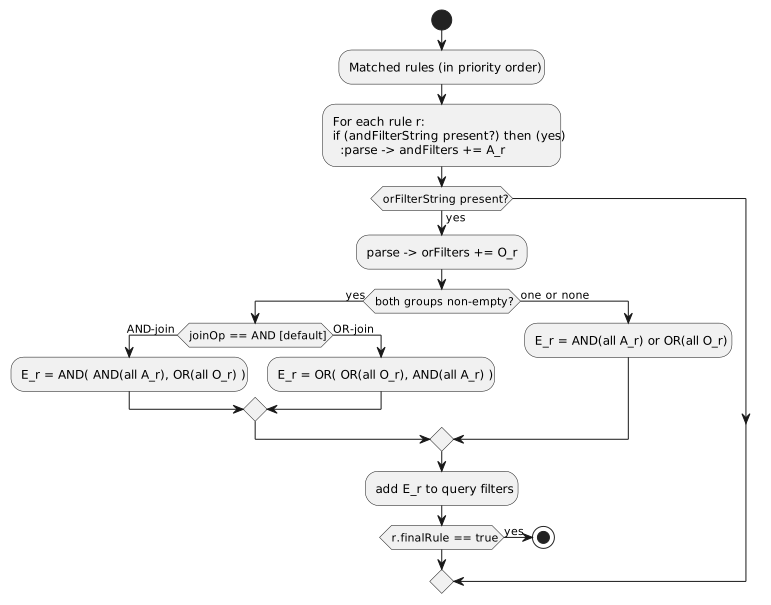
Composition algorithm (implemented in RuleContext.getFilters):
-
Collect all matched rules (in priority order; skipping NOT_APPLICABLE script results). For each rule:
-
If andFilterString is set, parse it into a Morphia Filter and add to the and-group.
-
If orFilterString is set, parse it into a Morphia Filter and add to the or-group.
-
-
If both groups are non-empty for the current rule:
-
If joinOp == AND (default): effective = AND( AND(all and-group), OR(all or-group) ).
-
If joinOp == OR: effective = OR( OR(all or-group), AND(all and-group) ).
-
-
If only one group is non-empty:
-
Use AND(all and-group) or OR(all or-group) as the effective filter.
-
-
Append the effective filter(s) to the query’s filter list. If the rule has finalRule: true, stop accumulating more filters.
-
Deduplicate filters by string form before returning.
Examples:
-
AND only
- name: tenant-scope
  securityURI:
    header: { identity: USER, area: sales, functionalDomain: order, action: view }
    body:   { realm: '*', orgRefName: '*', accountNumber: '*', tenantId: '*', ownerId: '*', dataSegment: '*', resourceId: '*' }
  andFilterString: "dataDomain.tenantId:${pcontext.dataDomain.tenantId}"
  effect: ALLOW
  priority: 200
Resulting Morphia: AND( eq("dataDomain.tenantId", <caller-tenant>) )
-
OR only
- name: visibility-by-segment
  securityURI:
    header: { identity: USER, area: sales, functionalDomain: order, action: view }
    body:   { realm: '*', orgRefName: '*', accountNumber: '*', tenantId: '*', ownerId: '*', dataSegment: '*', resourceId: '*' }
  orFilterString: "dataDomain.dataSegment:^[PUBLIC|INTERNAL]"
  effect: ALLOW
  priority: 210
Resulting Morphia: OR( in("dataDomain.dataSegment", [PUBLIC, INTERNAL]) )
-
AND + OR with joinOp: AND (default)
- name: own-or-public
  securityURI:
    header: { identity: USER, area: security, functionalDomain: userProfile, action: view }
    body:   { realm: '*', orgRefName: '*', accountNumber: '*', tenantId: '*', ownerId: '*', dataSegment: '*', resourceId: '*' }
  andFilterString: "dataDomain.ownerId:${principalId}"
  orFilterString:  "dataDomain.dataSegment:^[PUBLIC]"
  joinOp: AND
  effect: ALLOW
  priority: 220
Effective: AND( eq(ownerId, principalId), OR(eq(dataSegment, 'PUBLIC')) )
-
AND + OR with joinOp: OR
- name: owner-or-segment
  securityURI:
    header: { identity: USER, area: files, functionalDomain: document, action: view }
    body:   { realm: '*', orgRefName: '*', accountNumber: '*', tenantId: '*', ownerId: '*', dataSegment: '*', resourceId: '*' }
  andFilterString: "dataDomain.ownerId:${principalId}"
  orFilterString:  "tags:^[shared]"
  joinOp: OR
  effect: ALLOW
  priority: 230
Effective: OR( eq(ownerId, principalId), AND(eq(tags, 'shared')) )
Placeholders and variables:
The following standard variables are available in andFilterString/orFilterString:
| Variable | Source | Description |
|---|---|---|
|
PrincipalContext.userId |
The authenticated user’s ID |
|
PrincipalContext.dataDomain.accountNum |
The principal’s account number |
|
PrincipalContext.dataDomain.tenantId |
The principal’s tenant ID |
|
PrincipalContext.dataDomain.ownerId |
The data owner ID |
|
PrincipalContext.dataDomain.orgRefName |
The organization reference name |
|
PrincipalContext.defaultRealm |
The current realm (changes with X-Realm override) |
|
ResourceContext.resourceId |
The target resource ID |
|
ResourceContext.action |
The action being performed |
|
ResourceContext.functionalDomain |
The functional domain |
|
ResourceContext.area |
The functional area |
|
DomainContext.tenantId |
Tenant ID from the current domain context |
|
DomainContext.orgRefName |
Organization reference name from domain context |
|
DomainContext.accountId |
Account ID from domain context |
|
DomainContext.dataSegment |
Data segment number from domain context |
X-Realm integration: When X-Realm is used, ${defaultRealm} automatically reflects the target realm. This enables permission filters to dynamically scope data based on the active realm:
- name: scope-by-realm
  securityURI:
    header: { identity: USER, area: '*', functionalDomain: '*', action: view }
    body:   { realm: '*', orgRefName: '*', accountNumber: '*', tenantId: '*', ownerId: '*', dataSegment: '*', resourceId: '*' }
  andFilterString: "dataDomain.tenantId:${defaultRealm}"
  effect: ALLOW
priority: 200-
The filter DSL is described in the Query Language guide; it maps to Morphia dev.morphia.query.filters.Filters under the hood via MorphiaUtils.convertToFilter.
15.3. AccessListResolvers (SPI) for list-based access
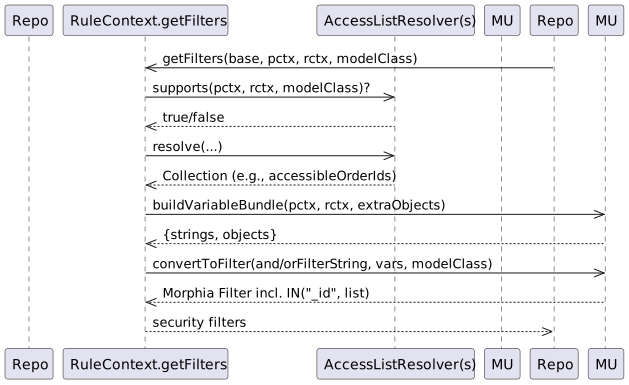
AccessListResolvers let you plug in computed collections (IDs, codes, emails, etc.) at request time and reference them from andFilterString/orFilterString. This is ideal for ACL-style list checks or integrating with external systems that decide which resources a user may access.
How it works (as implemented):
-
SPI: com.e2eq.framework.securityrules.AccessListResolver
-
key(): the variable name published to the filter variable bundle (e.g., "accessibleCustomerIds").
-
supports(pctx, rctx, modelClass): return true when this resolver applies for the current request and repository model type.
-
resolve(pctx, rctx, modelClass): return a Collection<?> which will be available as ${<key>} in filter strings.
-
RuleContext.getFilters discovers all AccessListResolver beans via CDI, calls supports(…), and for those that apply it puts key() → resolve(…) into the "extraObjects" map. MorphiaUtils.buildVariableBundle merges these into the variable set used by convertToFilter.
-
In your filter DSL, use:
-
IN with resolver-provided lists: field:^${key}
-
Equality with resolver-provided scalars: field:${key}
-
You can also reference nested principals: ${pcontext.dataDomain.tenantId}, ${principalId}, etc.
Examples:
-
Restrict Orders to the set of ids returned by a resolver
- name: orders-by-acl
  securityURI:
    header: { identity: USER, area: sales, functionalDomain: order, action: view }
    body:   { realm: '*', orgRefName: '*', accountNumber: '*', tenantId: '*', ownerId: '*', dataSegment: '*', resourceId: '*' }
  andFilterString: "_id:^${accessibleOrderIds}"
  effect: ALLOW
priority: 200-
Use resolver that returns customer codes and OR with a public segment
- name: customer-code-or-public
  securityURI:
    header: { identity: USER, area: crm, functionalDomain: customer, action: view }
    body:   { realm: '*', orgRefName: '*', accountNumber: '*', tenantId: '*', ownerId: '*', dataSegment: '*', resourceId: '*' }
  andFilterString: "code:^${visibleCustomerCodes}"
  orFilterString:  "dataDomain.dataSegment:^[PUBLIC]"
  joinOp: OR
  effect: ALLOW
  priority: 210
Reference implementation (tests/examples): - RuleContext.getFilters collects resolvers and exposes them to the filter StringSubstitutor via MorphiaUtils.buildVariableBundle. - See also: quantum-framework/src/test/java/com/e2eq/framework/securityrules/TestCustomerAccessResolver.java and TestStringAccessResolver.java for sample resolvers.
Guidance: - Keep keys stable and document them; they form your contract between resolver authors and rule authors. - Always scope resolver queries by tenant/realm from PrincipalContext/ResourceContext. - Return empty collections instead of null. An empty IN list yields no matches, which is safe by default.
15.4. PrincipalContextPropertiesResolver (SPI) for custom principal properties
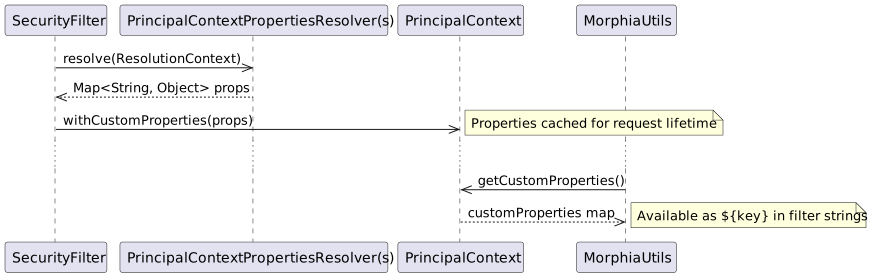
PrincipalContextPropertiesResolver allows applications to enrich PrincipalContext with custom, domain-specific properties during authentication. Unlike AccessListResolver (which is invoked per-query and scoped to specific resources), these properties are resolved once when the principal context is built and are available throughout the request lifecycle.
Use cases:
-
Associate/Sales Rep binding: Link a UserProfile to an Associate entity and expose
associateIdfor filtering -
Territory assignments: Expose
accessibleTerritoryIdsbased on the user’s role assignments -
Organizational hierarchies: Expose
accessibleLocationIdsvia ontology relationships -
Custom attributes: Any domain-specific property needed for security filtering
How it works:
-
SPI:
com.e2eq.framework.model.securityrules.PrincipalContextPropertiesResolver -
priority(): Execution order (lower = earlier). Default: 1000. -
resolve(ResolutionContext): Return a Map<String, Object> of properties to add to PrincipalContext. -
ResolutionContextprovides access to: -
isAnonymous(),getPrincipalName(),getIdentityRoles(): Security identity info -
getUserId(),getSubjectId(): User identifiers -
getRealm(),getDataDomain(),getDomainContext(): Realm and domain context -
getHeader(name): HTTP request headers -
getJwtClaim(name): JWT token claims -
hasCredentials(),getCredentialUserId(),getCredentialRoles(): Database credentials -
SecurityFilter discovers all resolvers via CDI, invokes them in priority order, and merges results into PrincipalContext.customProperties.
-
MorphiaUtils.createStandardVariableMapFrom includes custom properties, making them available as
${key}in filter strings.
Example implementation:
package com.myapp.security;

import com.e2eq.framework.model.securityrules.PrincipalContextPropertiesResolver;
import com.e2eq.framework.model.securityrules.ResolutionContext;
import com.e2eq.ontology.repo.OntologyEdgeRepo;
import jakarta.enterprise.context.ApplicationScoped;
import jakarta.inject.Inject;
import java.util.*;

@ApplicationScoped
public class AssociatePropertiesResolver implements PrincipalContextPropertiesResolver {

    @Inject
    OntologyEdgeRepo edgeRepo;

    @Override
    public int priority() {
        return 100; // Run early
    }

    @Override
    public Map<String, Object> resolve(ResolutionContext context) {
        Map<String, Object> properties = new HashMap<>();

        // Skip for anonymous users
        if (context.isAnonymous()) {
            return properties;
        }

        String userProfileId = context.getSubjectId().orElse(context.getUserId());

        // Find Associate linked to this UserProfile via hasUser relationship
        // Associate.hasUser -> UserProfile (functional/1:1)
        Optional<String> associateId = edgeRepo.singleSrcIdByDst(
            context.getDataDomain(), "hasUser", userProfileId);

        if (associateId.isPresent()) {
            properties.put("associateId", associateId.get());

            // Get territories this associate can access
            Set<String> territoryIds = edgeRepo.dstIdsBySrc(
                context.getDataDomain(), "assignedToTerritory", associateId.get());
            properties.put("accessibleTerritoryIds", territoryIds);

            // Get locations via inferred canSeeLocation edge
            Set<String> locationIds = edgeRepo.dstIdsBySrc(
                context.getDataDomain(), "canSeeLocation", associateId.get());
            properties.put("accessibleLocationIds", locationIds);
        }

        return properties;
    }
}
Using custom properties in rules:
# Filter locations to those the associate can see
- name: associate-location-access
  securityURI:
    header: { identity: sales-rep, area: sales, functionalDomain: location, action: view }
    body:   { realm: '*', orgRefName: '*', accountNumber: '*', tenantId: '*', ownerId: '*', dataSegment: '*', resourceId: '*' }
  andFilterString: "dataDomain.tenantId:${pTenantId}"
  orFilterString: "_id:^${accessibleLocationIds}"
  effect: ALLOW
  priority: 200
# Filter orders by territory
- name: territory-order-access
securityURI:
header: { identity: sales-rep, area: sales, functionalDomain: order, action: view }
body: { realm: '*', orgRefName: '*', accountNumber: '*', tenantId: '*', ownerId: '*', dataSegment: '*', resourceId: '*' }
andFilterString: "dataDomain.tenantId:${pTenantId} AND territoryId:^${accessibleTerritoryIds}"
effect: ALLOW
priority: 200Accessing properties programmatically:
// In application code or postconditionScript
PrincipalContext pctx = SecurityContext.getPrincipalContext().get();

// Get a single property
String associateId = (String) pctx.getCustomProperty("associateId");

// Get with type safety
Set<String> locationIds = pctx.getCustomProperty("accessibleLocationIds", Set.class);

// Get all custom properties
Map<String, Object> allProps = pctx.getCustomProperties();
Comparison: PrincipalContextPropertiesResolver vs AccessListResolver
| Aspect | PrincipalContextPropertiesResolver | AccessListResolver |
|---|---|---|
When invoked |
Once during authentication (eager) |
Per query during rule evaluation (lazy) |
Context available |
SecurityIdentity, JWT claims, HTTP headers, Credentials |
PrincipalContext, ResourceContext, ModelClass |
Caching |
Cached in PrincipalContext for request lifetime |
Per-request via RuleContext |
Use case |
User-level properties constant across all queries |
Resource-specific access lists that vary by model/action |
Performance |
Single invocation per request |
Invoked per repository call |
Guidance:
-
Use PrincipalContextPropertiesResolver for properties that apply to the user regardless of what resource they’re accessing (e.g., associate ID, territory assignments).
-
Use AccessListResolver when the access list depends on the specific resource type or action being performed.
-
Both mechanisms can coexist and complement each other.
-
Return empty maps (not null) from resolvers; resolver failures are logged and skipped, not propagated.
-
Properties should not override built-in PrincipalContext fields (userId, roles, etc.).
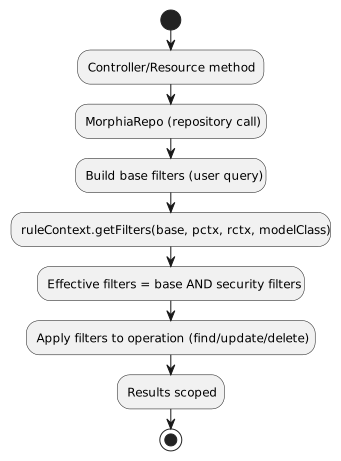
Where filters are applied (MorphiaRepo methods):
-
getList / getListByQuery / find: RuleContext.getFilters augments the base filters with the effective security filters before executing the query.
-
count: same as read paths, ensuring counts reflect scoped visibility.
-
save (create): rules typically do not inject filters for inserts; writes are validated by separate preconditions or postconditionScript. If your policy encodes write-scope, author UPDATE/DELETE rules to guard modifications rather than CREATE, unless your domain enforces ownership/tenant on insert.
-
update / merge / set / bulk set: the security filters are ANDed into the target selection so only documents visible under the policy are affected.
-
delete (by id or by query): security filters are applied to the selection to prevent deleting outside the allowed scope.
Implementation reference:
// Repositories call into RuleContext to augment filters
List<Filter> filters = ruleContext.getFilters(baseFilters,
    SecurityContext.getPrincipalContext().get(),
    SecurityContext.getResourceContext().get(),
    getPersistentClass());
Query<T> query = datastore.find(getPersistentClass()).filter(filters.toArray(new Filter[0]));
Notes:
-
Filters are applied regardless of whether the match decision was ALLOW or DENY; only ALLOW rules contribute filters. DENY rules decide the outcome but do not add filters.
-
finalRule: true stops evaluating later rules for both decision and filter contribution.
-
If no ALLOW rules match, repositories may still execute with caller-provided filters, but upstream permission checks should have DENIED the action; by convention, most endpoints call checkRules and short-circuit DENY before hitting the database.
Example impact per MorphiaRepo method:
-
save: no security filters are injected into the insert operation; enforce ownership/tenant fields via model validation and/or postconditionScript.
-
find/findById: adds security filters; if the requested id is outside scope, the result is empty.
-
getList/getListByQuery: adds security filters to user-supplied query; scope cannot be broadened by the client.
-
update/merge: AND the security filters into the update selector; records outside scope are unaffected.
-
delete: AND the security filters into the delete selector; out-of-scope records are not removed.
Example payload:
{
  "refName": "defaultUserPolicy",
  "displayName": "Default user policy",
  "principalId": "user",
  "description": "Users can act on their own data; deny dangerous ops in security area",
  "rules": [
    {
      "name": "view-own-resources",
      "description": "Limit reads to owner and default data segment",
      "securityURI": {
        "header": { "identity": "user", "area": "*", "functionalDomain": "*", "action": "*" },
        "body":   { "realm": "*", "orgRefName": "*", "accountNumber": "*", "tenantId": "*", "ownerId": "*", "dataSegment": "*", "resourceId": "*" }
      },
      "andFilterString": "dataDomain.ownerId:${principalId}&&dataDomain.dataSegment:#0",
      "effect": "ALLOW",
      "priority": 300,
      "finalRule": false
    },
    {
      "name": "deny-delete-in-security",
      "securityURI": {
        "header": { "identity": "user", "area": "security", "functionalDomain": "*", "action": "delete" },
        "body":   { "realm": "*", "orgRefName": "*", "accountNumber": "*", "tenantId": "*", "ownerId": "*", "dataSegment": "*", "resourceId": "*" }
      },
      "effect": "DENY",
      "priority": 100,
      "finalRule": true
    }
  ]
}
15.5. Endpoints
All endpoints are relative to /security/permission/policies. These are inherited from BaseResource and are consistent across entity resources.
-
GET /list
-
Query params: skip, limit, filter, sort, projection
-
Returns a Collection<Policy> with paging metadata; respects X-Realm.
-
-
GET /id/{id} and GET /id?id=…
-
Fetch a single Policy by id.
-
-
GET /refName/{refName} and GET /refName?refName=…
-
Fetch a single Policy by refName.
-
-
GET /count?filter=…
-
Returns a CounterResponse with total matching entities.
-
-
GET /schema
-
Returns JSON Schema for Policy.
-
-
POST /
-
Create or upsert a Policy (if id is present and matches an existing entity in the selected realm, it is updated).
-
-
PUT /set?id=…&pairs=field:value
-
Targeted field updates by id. pairs is a repeated query parameter specifying field/value pairs.
-
-
PUT /bulk/setByQuery?filter=…&pairs=…
-
Bulk updates by query. Note: ignoreRules=true is not supported on this endpoint.
-
-
PUT /bulk/setByIds
-
Bulk updates by list of ids posted in the request body.
-
-
PUT /bulk/setByRefAndDomain
-
Bulk updates by a list of (refName, dataDomain) pairs in the request body.
-
-
DELETE /id/{id} (or /id?id=…)
-
Delete by id.
-
-
DELETE /refName/{refName} (or /refName?refName=…)
-
Delete by refName.
-
-
CSV import/export endpoints for bulk operations:
-
GET /csv – export as CSV (field selection, encoding, etc.)
-
POST /csv – import CSV into Policies
-
POST /csv/session – analyze CSV and create an import session (preview)
-
POST /csv/session/{sessionId}/commit – commit a previously analyzed session
-
DELETE /csv/session/{sessionId} – cancel a session
-
GET /csv/session/{sessionId}/rows – page through analyzed rows
-
-
Index management (admin only):
-
POST /indexes/ensureIndexes/{realm}?collectionName=policy
-
Headers:
-
Authorization: Bearer <token>
-
X-Realm: realm identifier (optional but recommended in multi-tenant deployments)
Filtering and sorting:
-
filter uses the ANTLR-based DSL (see REST CRUD > Query Language)
-
sort uses comma-separated fields with optional +/- prefix; projection accepts a comma-separated field list
15.6. Examples
-
Create or update a Policy
curl -X POST \
  -H "Authorization: Bearer $JWT" \
  -H "Content-Type: application/json" \
  -H "X-Realm: system-com" \
  https://host/api/security/permission/policies \
-d @policy.json-
List policies for principalId=user
curl -H "Authorization: Bearer $JWT" \
     -H "X-Realm: system-com" \
"https://host/api/security/permission/policies/list?filter=principalId:'user'&sort=+refName&limit=50"-
Delete a policy by refName
curl -X DELETE \
  -H "Authorization: Bearer $JWT" \
  -H "X-Realm: system-com" \
  "https://host/api/security/permission/policies/refName/defaultUserPolicy"
15.7. How changes affect rule bases and enforcement
-
Persistence vs. in-memory rules:
-
PolicyResource updates the persistent store of policies (one policy per principalId or role with a list of rules).
-
RuleContext is the in-memory evaluator used by repositories and resources to enforce permissions. It matches SecurityURIHeader/Body, orders rules by priority, and applies effects and filters.
-
Making persisted policy changes effective:
-
On startup, migrations (see InitializeDatabase and AddAnonymousSecurityRules) typically seed default policies and/or programmatically add rules to RuleContext.
-
When you modify policies via REST, you have two options to apply them at runtime:
-
Implement a reload step that reads policies from PolicyRepo and rehydrates RuleContext (for example, RuleContext.clear(); then add rules built from current policies).
-
Restart the service or trigger whatever policy-loader your application uses at boot.
-
-
Tip: If you maintain a background watcher or admin endpoint to refresh policies, keep it tenant/realm-aware and idempotent.
-
Evaluation semantics (recap):
-
Rules are sorted by ascending priority; the first decisive rule sets the outcome. finalRule=true stops further processing.
-
andFilterString/orFilterString contribute repository filters through RuleContext.getFilters(), constraining result sets and write scopes.
-
principalId can be a concrete userId or a role; RuleContext considers both the principal and all associated roles.
-
Safe rollout:
-
Create new policies with a higher numeric priority (lower precedence) first, test with GET /schema and dry-run queries.
-
Use realm scoping via X-Realm to stage changes in a non-production realm.
-
Prefer DENY with low priority numbers for critical protections.
See also: - Permissions: Matching Algorithm, Priorities, and Multiple Matching RuleBases (sections above) - REST CRUD: Query Language and generic endpoint behaviors
16. Realm override (X-Realm) and Impersonation (X-Impersonate)
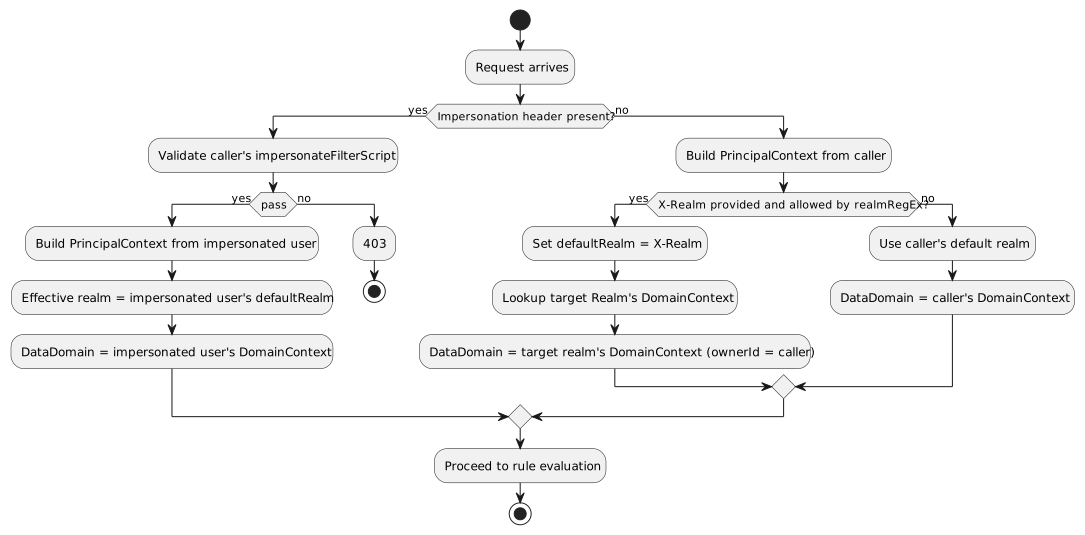
This section explains how to use the request headers X-Realm, X-Impersonate-, and X-Acting-On-Behalf-Of- alongside permission rule bases. These headers influence which realm (database) a request operates against and, in the case of impersonation, which identity’s roles are evaluated by the rule engine.
16.1. What they do (at a glance)
-
X-Realm: Overrides the target realm (MongoDB database) used by repositories for this request. Your own identity and roles remain the same. The DataDomain is updated to the target realm’s default DomainContext (while preserving your userId as the ownerId). This ensures that data created via X-Realm is properly scoped to the target realm’s tenant/org structure.
-
X-Impersonate-Subject or X-Impersonate-UserId: Causes the request to run as another identity. The effective permissions become those of the impersonated identity (potentially more or less than your own). This is analogous to sudo on Unix or to "simulate a user/role" for troubleshooting.
-
X-Acting-On-Behalf-Of-Subject or X-Acting-On-Behalf-Of-UserId: Records that the caller is acting on behalf of another party (for audit/tracking purposes). Unlike impersonation, this does NOT change permissions—the caller retains their own identity and roles.
Only one of X-Impersonate-Subject or X-Impersonate-UserId may be supplied per request. Supplying both results in a 400/IllegalArgumentException.
16.2. How the headers integrate with permission evaluation
-
Rule matching and effects (ALLOW/DENY) still follow the standard algorithm described earlier.
-
With X-Realm (no impersonation):
-
The PrincipalContext.defaultRealm is set to the header value (after validation), and repositories operate in that realm.
-
The DataDomain is updated from the target realm’s DomainContext (org, tenant, account, dataSegment), while preserving your userId as the ownerId.
-
Your own roles and identity remain intact; the rule base is evaluated for your identity and roles but with the target realm’s data context.
-
Permission filter strings can use
${defaultRealm}to dynamically scope queries based on the active realm. -
With impersonation:
-
The PrincipalContext is rebuilt from the impersonated user’s credential. The effective roles used by the rule engine include the impersonated user’s roles; the platform also merges in the caller’s security roles from Quarkus SecurityIdentity. This means permissions can be a superset; design policy rules accordingly.
-
The effective realm for the request is set to the impersonated user’s default realm (not the X-Realm header). If you passed X-Realm, it is still validated (see below) but not used to override the impersonated default realm in the current implementation.
-
The DataDomain is set from the impersonated user’s DomainContext.
-
With Acting-On-Behalf-Of:
-
The caller retains their own identity, roles, realm, and DataDomain.
-
The X-Acting-On-Behalf-Of-Subject or X-Acting-On-Behalf-Of-UserId is recorded in the PrincipalContext for audit purposes.
-
This is useful for service-to-service calls or when a support agent needs to perform actions that should be attributed to a customer.
16.3. Required credential configuration (CredentialUserIdPassword)
Two fields on CredentialUserIdPassword govern whether a user may use these headers:
-
realmRegEx (for X-Realm):
-
A wildcard pattern ("*" matches any sequence; case-insensitive) listing the realms a user is allowed to target with X-Realm.
-
If X-Realm is present but realmRegEx is null/blank or does not match the requested realm, the server returns 403 Forbidden.
-
Examples:
-
"*" → allow any realm
-
"acme-*" → allow realms that start with acme-
-
"dev|stage|prod" is not supported as-is; use wildcards like "dev*" and "stage*" or a combined pattern like "(dev|stage|prod)" only if you store a true regex. The current validator replaces '' with "." and matches case-insensitively.
-
impersonateFilterScript (for X-Impersonate-*):
-
A JavaScript snippet executed by the server (GraalVM) that must return a boolean. It receives three variables: username (the caller’s subject), userId (caller’s userId), and realm (the requested realm or current DB name).
-
If the script evaluates to false, the server returns 403 Forbidden for impersonation.
-
If the script is missing (null) and you attempt impersonation, the server rejects the request with 400/IllegalArgumentException.
Example impersonation script (allow only company admins to impersonate in dev realms):
// username = caller's subject, userId = caller's userId, realm = requested realm (or current)
(username.endsWith('@acme.com') && realm.startsWith('dev-'))
Tip: Manage these two fields via your auth provider’s admin APIs or directly through CredentialRepo in controlled environments.
16.4. End-to-end behavior from SecurityFilter (reference)
The SecurityFilter constructs the PrincipalContext/ResourceContext before rule evaluation: - X-Realm is read and, if present, validated against the caller’s credential.realmRegEx. - If impersonation headers are present: - The caller’s credential.impersonateFilterScript is executed. If it returns true, the impersonated user’s credential is loaded and used to build the PrincipalContext. - The final PrincipalContext carries the impersonated user’s defaultRealm and roles (merged with the caller’s SecurityIdentity roles), and may copy area2RealmOverrides from the impersonated credential. - Without impersonation, the PrincipalContext is built from the caller’s credential; X-Realm, when valid, sets the defaultRealm for this request.
16.5. Practical differences and use cases
-
Realm override (X-Realm):
-
Who you are does not change; only where you act changes. Your permissions (as determined by policies attached to your identity/roles) are applied against data in the specified realm.
-
DataDomain changes: The DataDomain is updated from the target realm’s DomainContext (tenant, org, account), ensuring new records are created with the correct scoping.
-
Use cases:
-
Multi-tenant admin tooling that needs to inspect or repair data in customer realms.
-
Reporting or backfills where the same service is pointed at different tenant databases per request.
-
Creating data in a target realm with proper DataDomain stamping.
-
Impersonation (X-Impersonate-*):
-
Who you are (for authorization purposes) changes. You act with the impersonated identity’s permissions; depending on your configuration, additional caller roles may be merged.
-
The DataDomain is set from the impersonated user’s credential.
-
Use cases:
-
Temporary elevation to an admin identity (sudo-like) for break-glass operations.
-
Simulate what a given role/identity can see/do for troubleshooting or customer support.
-
Testing user-specific permission rules without logging in as that user.
-
Acting-On-Behalf-Of (X-Acting-On-Behalf-Of-*):
-
Who you are does NOT change; you retain your own identity, roles, realm, and DataDomain.
-
The "acting on behalf of" information is recorded in the PrincipalContext for audit trails.
-
Use cases:
-
Service-to-service calls where the downstream service needs to know the original requestor.
-
Support agents performing actions that should be audited as being done "on behalf of" a customer.
-
Compliance and audit requirements where the chain of delegation must be recorded.
Caveats: - Never set a permissive impersonateFilterScript in production. Keep it restrictive and auditable. - When using both X-Realm and impersonation in one call, be aware that the effective realm will be the impersonated user’s default realm; X-Realm is not applied in the impersonation branch in the current implementation. - realmRegEx must be populated for any user who needs realm override; leaving it blank effectively disables X-Realm for that user. - Acting-On-Behalf-Of headers do NOT grant any additional permissions; they are purely for audit purposes.
16.6. Examples
-
List policies in a different realm using your own identity
curl -H "Authorization: Bearer $JWT" \
     -H "X-Realm: acme-prod" \
"https://host/api/security/permission/policies/list?limit=20&sort=+refName"-
Simulate another user by subject while staying in their default realm
curl -H "Authorization: Bearer $JWT" \
     -H "X-Impersonate-Subject: 3d8f4e7b-...-idp-subject" \
"https://host/api/security/permission/policies/list?limit=20"-
Attempt impersonation with a realm hint (validated by script; effective realm = impersonated default)
curl -H "Authorization: Bearer $JWT" \
     -H "X-Realm: dev-acme" \
     -H "X-Impersonate-UserId: tenant-admin" \
     "https://host/api/security/permission/policies/list?limit=20"
Security outcomes in all cases continue to be driven by your rule bases (Policy rules) matched against the effective PrincipalContext and ResourceContext.
17. Data domain assignment on create: DomainContext and DataDomainPolicy
This section explains how Quantum decides which dataDomain is stamped on newly created records, why this decision is necessary in a multi‑tenant system, what the default behavior is, and how you can override it globally or per Functional Area / Functional Domain. It also describes the DataDomainResolver interface and the default implementation provided by the framework.
17.1. The problem this solves (and why it matters)
In a multi‑tenant platform you must ensure each new record is written to the correct data partition so later reads/updates can be scoped safely. If the dataDomain is wrong or missing, you risk leaking data across tenants or making your own data inaccessible due to mis‑scoping.
Historically, Quantum set the dataDomain of new entities to match the creator’s credential (i.e., the principal’s DomainContext → DataDomain). That default is sensible in many cases, but real systems often need more specific behavior per business area or type. For example: - You may centralize HR records in a single org‑level domain regardless of who created them. - Sales invoices for EU customers must live under an EU data segment. - A specific product area might always write into a shared catalog domain separate from the author’s tenant.
These needs require a simple, deterministic way to override the default per Functional Area and/or Functional Domain.
17.2. Key concepts recap: DomainContext and DataDomain
- DomainContext (on credentials/realms)
-
captures the principal’s scoping defaults (realm, org/account/tenant identifiers, data segment). At request time this is materialized into a DataDomain.
- DataDomain
-
is what gets stamped onto persisted entities and later used by repositories to constrain queries and updates.
If you do nothing, new records inherit the principal’s DataDomain.
17.3. The default policy (do nothing and it works)
Out of the box, Quantum preserves the existing behavior: if no policy is configured, the resolver falls back to the authenticated principal’s DataDomain. This guarantees compatibility with existing applications.
Concretely: - ValidationInterceptor checks if an entity being persisted lacks a dataDomain. - If missing, it calls DataDomainResolver.resolveForCreate(area, domain). - The DefaultDataDomainResolver first looks for overrides (credential‑attached or global); if none match, it returns the principal’s DataDomain from the current SecurityContext.
17.4. Policy scopes: principal‑attached vs. global
You can define overrides at two levels: - Principal‑attached (per credential): attach a DataDomainPolicy to a CredentialUserIdPassword. The SecurityFilter places this policy into the PrincipalContext, so it applies only to records created by that principal. This is useful for VIP service accounts or specific partners. - Global policy: an application‑wide DataDomainPolicy provided by GlobalDataDomainPolicyProvider. If present, this applies when the principal has no specific override for the matching area/domain.
Precedence: principal‑attached policy wins over global policy; if neither applies, fall back to the principal’s credential domain.
17.5. The policy map and matching
A DataDomainPolicy is a small map of rules: Map<String, DataDomainPolicyEntry> policyEntries, keyed by "<FunctionalArea>:<FunctionalDomain>" with support for "*" wildcards. The resolver evaluates keys in this order:
-
area:domain (most specific)
-
area:*
-
*:domain
-
: (global catch‑all)
-
Fallback to principal’s domain if no entry yields a value
Each DataDomainPolicyEntry has a resolutionMode: - FROM_CREDENTIAL (default): use the principal’s credential domain (i.e., the historical behavior). - FIXED: use the first DataDomain listed in dataDomains on the entry.
Example policy definitions (illustrative JSON):
{
  "policyEntries": {
    "Sales:Invoice": { "resolutionMode": "FIXED", "dataDomains": [ {"orgRefName": "ACME", "tenantId": "eu-1", "dataSegment": "INVOICE"} ] },
    "Sales:*":      { "resolutionMode": "FROM_CREDENTIAL" },
    "*:HR":         { "resolutionMode": "FIXED", "dataDomains": [ {"orgRefName": "GLOBAL", "tenantId": "hr", "dataSegment": "HR"} ] },
    "*:*":          { "resolutionMode": "FROM_CREDENTIAL" }
  }
}
Behavior of the above: - Sales:Invoice records always go to the fixed EU invoices domain. - Any other Sales:* creation uses the creator’s credential domain. - All HR records go to a central HR domain. - Otherwise, default to the creator’s domain.
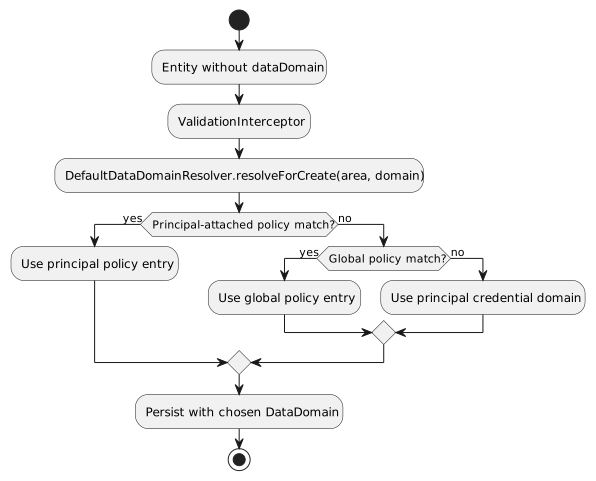
17.6. How the resolver works
Interfaces and default implementation:
public interface DataDomainResolver {
  DataDomain resolveForCreate(String functionalArea, String functionalDomain);
}

@ApplicationScoped
public class DefaultDataDomainResolver implements DataDomainResolver {
  @Inject GlobalDataDomainPolicyProvider globalPolicyProvider;
  public DataDomain resolveForCreate(String area, String domain) {
    DataDomain principalDD = SecurityContext.getPrincipalDataDomain()
      .orElseThrow(() -> new IllegalStateException("Principal context not providing a data domain"));
    List<String> keys = List.of(areaOrStar(area)+":"+areaOrStar(domain), areaOrStar(area)+":*", "*:"+areaOrStar(domain), "*:*");
    // 1) principal‑attached policy from PrincipalContext
    DataDomain fromPrincipal = resolveFrom(policyFromPrincipal(), keys, principalDD);
    if (fromPrincipal != null) return fromPrincipal;
    // 2) global policy
    DataDomain fromGlobal = resolveFrom(globalPolicyProvider.getPolicy().orElse(null), keys, principalDD);
    if (fromGlobal != null) return fromGlobal;
    // 3) default fallback
    return principalDD;
  }
}
Integration point: - ValidationInterceptor injects DataDomainResolver and calls it in prePersist when an entity’s dataDomain is null. - SecurityFilter propagates a principal’s attached DataDomainPolicy (if any) into the PrincipalContext so the resolver can see it.
17.7. When would you want a non‑global policy?
Here are a few concrete scenarios: - Centralized HR: All HR Employee records are written to a shared HR domain regardless of the team creating them. This supports a shared‑service HR model without duplicating HR data per tenant. - Regulated invoices: In the Sales:Invoice domain for EU, you must write under a specific EU tenantId/dataSegment to satisfy data residency. Other Sales domains can keep default behavior. - Shared catalog: The Catalog:Item domain is a cross‑tenant shared catalog maintained by a core team. Writes should go to a canonical catalog domain even when initiated by tenant‑specific users. - VIP account override: A particular integration user should always write to a staging domain for testing purposes, while all others use defaults. Attach a small policy to just that credential.
17.8. Relation to tenancy models
The policy mechanism supports both siloed and pooled tenancy: - Siloed tenancy: Most domains default to FROM_CREDENTIAL (each tenant writes to its own partition). Only a few shared services (e.g., HR, catalog) use FIXED to centralize data. - Pooled tenancy: You may lean on FIXED policies more often to route writes into pooled/segment‑specific domains (e.g., region, product line), while still enforcing read/write scoping via permissions.
Because the resolver always validates through the principal context and falls back safely, you can introduce overrides gradually without destabilizing existing flows.
17.9. Authoring tips
-
Start with no policy and verify your default flows. Add entries only where necessary.
-
Prefer specific keys (area:domain) for clarity; use wildcards sparingly.
-
Keep FIXED DataDomain objects minimal and valid for your deployment (orgRefName, tenantId, and dataSegment as needed).
-
Document any global policy so teams know which areas are centralized.
17.10. API pointers
-
CredentialUserIdPassword.dataDomainPolicy: optional per‑credential overrides (propagated to PrincipalContext).
-
GlobalDataDomainPolicyProvider: holds an optional in‑memory global policy (null by default).
-
DataDomainPolicyEntry.resolutionMode: FROM_CREDENTIAL (default) or FIXED.
-
DataDomainResolver / DefaultDataDomainResolver: the extension point and default behavior.
17.11. Ontology in Permission Rules (optional)
If you enable the ontology modules, you can author rules that constrain access by semantic relationships, not field paths. This keeps policies stable as your object model evolves.
Key idea
-
Materialize edges in Mongo using OntologyMaterializer (e.g., placedInOrg, orderShipsToRegion).
-
During rule evaluation, translate a semantic constraint like "has edge placedInOrg to OrgX" into a set of IDs, and combine that with your query.
How to use
-
Preferred: author a rule with a semantic hint and let the application translate it via ListQueryRewriter.
-
Minimal change path: publish a variable via an AccessListResolver and use an IN filter over _id.
Example (resolver + IN filter)
-
Add an AccessListResolver that returns order IDs for which (tenantId, p="placedInOrg", dst=orgRefName) exists.
-
In your rule’s AND filter string (query language), use: id:^${idsByPlacedInOrg}
See also
-
Ontology overview and examples: Ontologies in Quantum
-
Integration with Morphia and multi-tenancy: Integrating Ontology
Operational notes
-
Ontology is optional. Enable it per service when the config flag and dependencies are present.
-
Always scope edge queries by tenantId sourced from RuleContext.
-
Index edges on (tenantId, p, dst) and (tenantId, src, p) for performance.
17.11.1. Rule language: add hasEdge()
We introduce a policy function/operator to reference ontology edges directly from rules. This lets policies constrain access by semantic relationships instead of field paths.
Signature
-
hasEdge(predicate, dstIdOrVar)
-
hasIncomingEdge(predicate, srcIdOrVar)
Parameters
-
predicate: String name of the ontology predicate (e.g., "placedInOrg", "orderShipsToRegion").
-
dstIdOrVar / srcIdOrVar: Either a concrete id/refName or a variable resolved from RuleContext (e.g., principal.orgRefName, request.region, ${principalId}).
Semantics
-
hasEdge: The rule grants/filters entities (sources) for which an edge exists: (tenantId, src = entity._id, p = predicate, dst = resolvedDst).
-
hasIncomingEdge: The rule grants/filters entities (targets) for which an edge exists: (tenantId, src = resolvedSrc, p = predicate, dst = entity._id). Useful for finding entities that are destinations of a relationship (e.g., "find locations reachable FROM an associate").
-
Multi-tenant safety: tenantId is always taken from RuleContext/DomainContext.
Composition
-
hasEdge and hasIncomingEdge can be combined with existing rule clauses (and/or/not) and other filters (states, tags, ownerId, etc.).
Examples
-
Allow viewing Orders in the caller’s org (including ancestors via ontology closure):
-
allow VIEW Order when hasEdge("placedInOrg", principal.orgRefName)
-
Restrict list to Orders shipping to a region chosen in request:
-
allow LIST Order when hasEdge("orderShipsToRegion", request.region)
-
Allow viewing Locations reachable from the current user:
-
allow VIEW Location when hasIncomingEdge("canAccessLocation", ${principalId})
|
In |
Under the hood
-
Policy evaluation resolves dstIdOrVar / srcIdOrVar against RuleContext (for example, principal.orgRefName → "OrgP").
-
The list/filter query is rewritten using ListQueryRewriter.rewriteForHasEdge(…) or rewriteForHasIncomingEdge(…), which turns the predicate and resolved ID into a set of target/source IDs and merges it with the base query efficiently.
-
OntologyEdgeDao must be indexed on (tenantId, p, dst) and (tenantId, src, p) for performance.
Full end-to-end example (implementation pattern)
1) Author a rule (illustrative YAML/pseudocode)
- name: list-orders-by-org
  priority: 100
  securityURI:
    header:
      identity: USER
      area: sales
      functionalDomain: order
      action: list
    body:
      realm: '*'
      accountNumber: '*'
      tenantId: '*'
      dataSegment: '*'
      ownerId: '*'
      resourceId: '*'
  effect: ALLOW
  # Semantic constraint expressed via ontology helper in postconditionScript
  postconditionScript: hasEdge("placedInOrg", pcontext?.dataDomain?.orgRefName) === true
Another example using hasIncomingEdge:
- name: view-reachable-locations
  priority: 110
  securityURI:
    header:
      identity: USER
      area: core
      functionalDomain: location
      action: view
  effect: ALLOW
  # Find locations that the current user has a "canAccessLocation" edge to
  andFilterString: "hasIncomingEdge(canAccessLocation, ${principalId})"
2) Evaluate policy and apply constraint in the repository/list path
import com.e2eq.ontology.policy.ListQueryRewriter;
import com.e2eq.ontology.repo.OntologyEdgeRepo;
import com.mongodb.client.model.Filters;
import org.bson.conversions.Bson;

// Injected once per service when ontology is enabled (Quarkus CDI)
@jakarta.inject.Inject OntologyEdgeDao edgeDao;
ListQueryRewriter rewriter = new ListQueryRewriter(edgeDao);

// Inside your list method, after building the base filter
String tenantId = ruleContext.getRealmId(pctx, rctx); // or from DomainContext
String predicate = "placedInOrg";
String orgRefName = pctx.getDataDomain().getOrgRefName(); // resolves principal.orgRefName

Bson base = Filters.and(existingFilters...);
Bson rewritten = rewriter.rewriteForHasEdge(base, tenantId, predicate, orgRefName);
var results = datastore.getDatabase().getCollection("orders").find(rewritten).iterator();

// Example for hasIncomingEdge in code
Bson locationRewritten = rewriter.rewriteForHasIncomingEdge(locationBase, tenantId, "canAccessLocation", principalId);
3) Morphia-typed queries alternative
// If you’re using Morphia’s typed Query API
Set<String> ids = edgeDao.srcIdsByDst(tenantId, "placedInOrg", orgRefName);
if (ids.isEmpty()) {
  return java.util.List.of(); // short-circuit
}
query.filter(dev.morphia.query.filters.Filters.in("_id", ids));
Developer requirements and checklist
-
Enable ontology (optional feature): set e2eq.ontology.enabled=true in your app and add module dependencies.
-
Provide a TBox (OntologyRegistry) and run OntologyMaterializer on entity changes to keep edges up to date.
-
Inject EdgeDao as a CDI bean (@Inject); indexes are ensured automatically at startup.
-
Always pass tenantId from RuleContext/DomainContext; never cross tenants.
-
When using variables on the RHS (dstIdOrVar), ensure the RuleContext exposes them (for example, principal.orgRefName or request.region).
-
Monitor provenance (edge.prov) and re-materialize edges when intermediate nodes change.
Notes
-
hasEdge() is a policy function; it is evaluated before constructing database filters. It is not part of the core BIAPI query grammar.
-
If ontology is disabled, skip the rewrite (return base) or configure a no-op implementation so policies that include hasEdge are rejected early with a clear error message.
17.12. Label resolution SPI and hasLabel() in rules
Labels are a lightweight way to attach semantic markers to principals and resources, and then use them in rule scripts. Quantum provides a pluggable label resolution SPI and a script helper to check labels during policy evaluation.
Why labels? - Decouple policy from rigid fields (e.g., “VIP”, “HARD_DELETE_DISABLED”, “B2B”). - Compute labels from multiple sources (simple tags, advancedTags, dynamic attributes, or custom derivations).
Components
-
LabelResolver (SPI):
public interface LabelResolver { boolean supports(Class<?> type); java.util.Set<String> resolveLabels(Object entity); } -
DefaultLabelResolver (built-in): Applies to UnversionedBaseModel.
-
Collects tags (String[]), advancedTags.name, and optionally any dynamicAttributes whose isInheritable()==true, using best‑effort reflection.
-
LabelService: Aggregates all LabelResolver beans via CDI and delegates to the first that supports the entity type. Also supports annotation-based extraction (see below).
-
Annotations (optional, opt-in at your model):
@LabelSource(method = "computeLabels") // class-level method returning Collection<String>, String[], or String
public class MyEntity { ... }

public class MyEntity {
  @LabelField                // field can be Collection<String>, String[], or String
  private java.util.List<String> policyLabels;
}
Availability in rule scripts
During policy evaluation, RuleContext resolves labels for both principal and resource contexts and installs a script helper:
-
hasLabel(label: String) → Boolean
-
Returns true if the current resource context has the specified label.
-
Label resolution uses LabelService (including custom resolvers and annotations) at evaluation time.
Examples (postcondition script)
// Allow if the resource is labeled VIP
hasLabel("VIP")

// Combine with other helpers when ontology is enabled
hasLabel("RESTRICTED") && !hasEdge("placedInOrg", "OrgX")
Extending labels for your domain
-
Add a new resolver:
@jakarta.enterprise.context.ApplicationScoped public class InvoiceLabelResolver implements LabelResolver { public boolean supports(Class<?> type) { return type.getName().endsWith("Invoice"); } public java.util.Set<String> resolveLabels(Object entity) { var out = new java.util.LinkedHashSet<String>(); var inv = (com.example.Invoice) entity; if (inv.isHighValue()) out.add("HIGH_VALUE"); if (inv.isPastDue()) out.add("PAST_DUE"); return out; } } -
Or annotate your model with @LabelSource/@LabelField to contribute labels without writing a resolver.
Notes - Labels are resolved best‑effort; failures are swallowed to keep policy evaluation robust. - If multiple resolvers exist, the first that supports the type wins. Prefer narrow supports() checks. - Keep label names stable; treat them as part of your policy contract.
18. Script Helpers reference (when enabled)
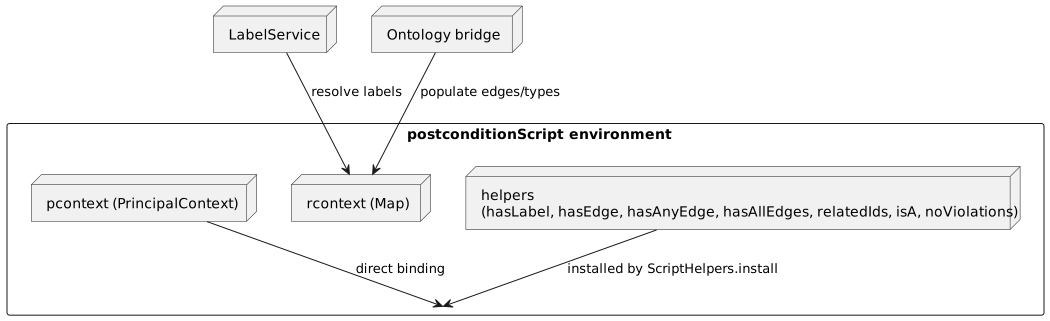
Script helpers are small functions injected into the postconditionScript environment to make common policy checks concise. They are provided by com.e2eq.ontology.policy.ScriptHelpers.install(…) when the optional ontology/label modules are present. In all cases, postconditionScript also has direct access to:
-
pcontext: the Java PrincipalContext for the caller
-
rcontext: a lightweight map for resource-related helper data (labels, types, edges, violations) when populated by your application
Availability notes: - Labels are made available by RuleContext via LabelService. hasLabel() checks the resource’s labels only. - Edges, types, and violations must be populated by your application into the rcontext map before calling RuleContext.runScript (typically via an ontology bridge). If absent, edge/type helpers return false/empty.
Helpers and examples:
-
isA(type: String) → Boolean
-
Purpose: Check whether the resource has a semantic type in rcontext.types.
-
Example:
// Allow when the resource is of type "Invoice" isA("Invoice") -
hasLabel(label: String) → Boolean
-
Purpose: Check whether the resource has a policy label (labels resolved via LabelService).
-
Example:
// Permit view if resource is labeled PUBLIC hasLabel("PUBLIC") -
hasEdge(predicate: String, dst: String|null) → Boolean
-
Purpose: True if an ontology edge with property p=predicate exists from the current resource to dst. If dst is null, true if any dst exists for the predicate.
-
Example:
// Require that this resource is placed in the caller's org hasEdge("placedInOrg", pcontext?.dataDomain?.orgRefName) -
hasIncomingEdge(predicate: String, src: String|null) → Boolean
-
Purpose: True if an ontology edge with property p=predicate exists from src to the current resource. If src is null, true if any src exists for the predicate.
-
Example:
// Permit view if the current resource is a location reachable from the caller hasIncomingEdge("canAccessLocation", principalId) -
hasAnyEdge(predicate: String, dsts: Collection<String>) → Boolean
-
Purpose: True if there is at least one edge to any of the destinations.
-
Example:
// Allow if the order ships to any of the selected regions hasAnyEdge("orderShipsToRegion", ["NA", "EU"]) === true -
hasAllEdges(predicate: String, dsts: Collection<String>) → Boolean
-
Purpose: True only if there is an edge for every destination in the list.
-
Example:
// Require all compliance flags to be present hasAllEdges("hasComplianceFlag", ["KYC", "AML"]) === true -
relatedIds(predicate: String) → List<String>
-
Purpose: Return the list of dst ids for edges with property p=predicate.
-
Example:
// Use in conjunction with a filter list variable (via AccessListResolver) var projectIds = relatedIds("belongsToProject"); projectIds && projectIds.length > 0 -
noViolations() → Boolean
-
Purpose: True if rcontext.violations is empty. Helpful when upstream validators populate violations.
-
Example:
// Deny action if any violations were detected earlier in the pipeline
noViolations() === true
Best practices: - Prefer simple boolean expressions; keep postconditionScript fast and side-effect free. - When using ontology helpers, always scope your edge materialization by tenantId to avoid cross-tenant leakage. - Combine helpers with SecurityURIBody scoping and repository filters for defense in depth.
Cross‑references: - Ontology usage and hasEdge: see Ontology in Permission Rules. - Label SPI and hasLabel: see Label resolution SPI. - AccessListResolver for list variables in filters: see "AccessListResolvers (SPI) for list-based access" above.